

Self Publishing Guide
Self-Publishing Explained
 |
Traditional publishers manage your book's production and distribution, but they also take control and ownership. For many authors, especially emerging ones, gaining a publishing deal is a significant hurdle.
Self-publishing means you are the publisher. Copy Direct handles the printing, so you own your books and retain 100% of your rights and profits. You are responsible for marketing and distribution, but the rewards are all yours.
Copy Direct - Your Short or Long Run Book Printing Experts
 |
 |
We specialise in high-quality, short to medium print runs (up to 1000 books). Copy Direct simplifies the printing process with our design and publishing expertise, advanced digital printing technology, and a focus on bookmaking.
Get professional-quality paperback or hardback books, from just 10 copies to over 1000.
Copy Direct can manage your entire self-publishing printing needs, delivering excellence from start to finish.
Let's Get Your Book Printed!
1. Choose Your Size:
Select your book's finished dimensions early. Sticking to standard sizes (like
A4, A5) is recommended to avoid layout issues. Unsure? Ask us!
2. Prepare Your Files:
- Best Format: Adobe PDF for perfect quality.
- Pro Tip: Adobe InDesign makes professional layout easy.
- Covers: Supply cover art, bio and photo separately.
- Photos: Embed high-resolution images.
3. Send Your Files:
- Email: For smaller files.
- File Sharing (WeTransfer): Ideal for larger documents. Send us the link!
Book Sizes & Paper Choices for Your Project
We use popular, cost-effective sizes like A4 and A5. Choose from:
 |
- Standard Laser: Budget-friendly for books and paperbacks.
- Art Paper (Matt/Gloss): For stunning photo books.
Understanding GSM
GSM (grams per square metre) indicates paper weight. The higher the GSM, the heavier and sturdier the paper. For reference:
- 80–100 gsm: Standard copy paper
- 128–170 gsm: Heavy paper
- 200 gsm: Light card
- 250 gsm: Medium card
- 300 gsm: Heavy card
- 350 gsm: Extra heavy card
We'll help you select the right paper weight to ensure your book is perfectly balanced and durable.
Get Your Free ISBN - Essential for Self Publishers
Unlock Your Book's Potential with an ISBN
An ISBN (International Standard Book Number) is a crucial 13-digit identifier for
 |
 |
your book. It's how the global book industry – from retailers to libraries – finds, orders, and manages your title.
Free for New Zealand Publishers: As a New Zealand author, you're eligible for a free ISBN from the National Library of New Zealand's Standard Book Numbering Agency.
Why an ISBN is a Must-Have
- Market Access: Necessary for selling your book through traditional channels and online retailers.
- Library Integration: Allows libraries worldwide to catalog and acquire your book.
- Professional Credibility: Demonstrates your book is a formally published work.
Apply Online Now
Visit the National Library of New Zealand's to request your ISBN at the link below.
https://natlib.govt.nz/forms/isbn
Format: Please present your ISBN to us precisely as issued.
What Is an ISBN Barcode?
An ISBN barcode is a machine-readable graphic, typically printed on the back cover of your book. It encodes your ISBN number into a format that can be scanned at point-of-sale systems used by bookstores and libraries.
Creating Your Barcode
Once you have your ISBN, the barcode must be created at high resolution to ensure accurate scanning.
Our team can create the barcode for you directly from your ISBN number, ensuring it meets all printing and retail requirements.
Find the binding style that suits you best
The following outlines several different styles of binding for you to consider and choose from.
You will see the following details on each style of finishing to help you choose what is best for the end user application of your manual.
 |
 |
 |
Perfect Binding
Perfect binding is the perfect bind. Perfect binding with Pur refers to polyurethane, the type of glue used, which is much stronger and heat resistant than other paper based EVA glues.
 |
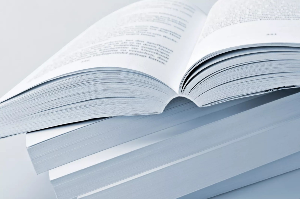 |
Perfect bound books are made up of stacked pages. These are gathered into
a book and the edges of the spine are ground off (or notched). When the book block is glued into a paper cover, the pur glue that attaches the sheets to the spine can flow into the notches or ground-off areas. The covers and book blocks are then trimmed flush.
Perfect bound books are square at the spine and use glue to hold the pages, like a paperback book. It gives your books a more professional feel. It can accommodate a page count up to 640 pages (320 leaves 80gsm).
PUR is strong and eco-friendly. Polyurethane Reactive, also called PUR, is a popular glue due to it's superior binding strength and eco friendliness.
Lay-flat - PUR glue is more flexible than EVA glue and provides lay flat qualities when the book is opened. It is ideal for music books and cookbooks, which are read on the desk, and two-page spread such as photo books. This lay-flat quality makes it easy to read books and extends the book life.
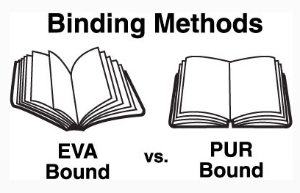 High Binding Strength and Durability - The binding strength is about three times stronger than the EVA glue. Coated paper or specialty stocks, which can be be a problem with EVA, are bound securely in PUR bound books. EVA glue binding strength becomes weaker over time. However, the PUR glue retains durability and flexibility in both high and low temperatures for long lasting book quality.
Another big advantage of the perfect bind is that you can also have information printed on the spine.
What Does A Perfect Bound Book Look Like - click here to view on YouTube.
Saddle Stitch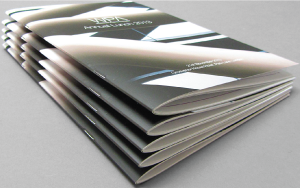
Saddle stitch booklet catalogue is suitable for 8pp (pages) to 100pp (pages). Finished size is normally A4 or A5 when closed, although custom sizes are also available. This style of catalogue typically has a heavier weight cover (200-300gsm) and content pages (80-150gsm) however some are the same weight throughout.
Saddle stitched is two staples inserted in the spine and folded in half to form a booklet.
This is the most economical method of finishing for a catalogue.
Designing Your Book Cover with Canva
Creating a professional, eye-catching cover is one of the most important steps in producing a successful book. A great cover not only attracts attention but also communicates the tone and quality of your story. For many authors and illustrators, we recommend using Canva as a simple and effective design tool.
Why We Recommend Canva
Canva is a user-friendly, web-based design platform that makes it easy for anyone — even without graphic design experience — to create high-quality book covers.
Easy to Use
Canva’s drag-and-drop interface allows you to quickly add images, text, colours, and design elements. This makes it ideal for self-publishers or first-time authors who want control over their design without needing advanced software skills.
Professional Templates
Canva offers a wide range of pre-designed templates that can be customised to suit your book. These templates provide a strong starting point and help ensure your layout looks balanced and visually appealing.
Perfect for Books
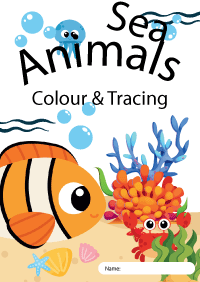
With access to thousands of fonts, illustrations, icons, and graphics, Canva is especially well-suited to children’s book covers. You can easily create fun, colourful, and engaging designs that appeal to young readers.
Correct Sizing & Custom Dimensions
You can set up your cover using custom dimensions to match your exact book size. This helps ensure your final design aligns correctly with your print specifications, including front cover, back cover, and spine layout.
Easy Collaboration
If you’re working with an illustrator or team, Canva makes it simple to share designs and collaborate in real time. Feedback and edits can be made quickly without complicated file transfers.
Print-Ready Export Options
Canva allows you to export your design as a high-quality PDF, which is ideal for printing. When setting up your file, we recommend:
• Using CMYK-friendly colours where possible
• Including bleed in your design
• Exporting as a PDF Print file
• Ensuring images are high resolution (300 DPI)
Support When You Need It
While Canva is a powerful and accessible tool, getting your file fully print-ready can still require a few technical adjustments. Our team at Copy Direct can review your artwork, check sizing, bleed, and spine setup, and help ensure your cover is ready for professional printing.
Using Canva is a great way to create a polished, professional children’s book cover without the complexity of advanced design software.
If you need guidance along the way, we’re here to help bring your vision to life.
To Learn more about Canva Book Cover Templates Click Here.
Copyright Guide for Self-Publishers in New Zealand
Self-publishing a book in Aotearoa is an exciting milestone, but navigating your rights as an independent author can feel overwhelming. In New Zealand, copyright protects your hard work and creative output automatically.Understanding the basics of the Copyright Act 1994 ensures you protect your own assets and avoid infringing on the rights of other creators.
Do I Need to Register My Copyright in NZ?
No, copyright protection applies automatically.There is no formal database or registration system for copyright in New Zealand. The minute your original story, poem, or textbook is recorded—either digitally on a computer or physically on paper—it is legally protected under the law.
What Is and Is Not Covered?
The Intellectual Property Office of New Zealand (IPONZ) draws a firm line between ideas and expressions.
Protected Work
- Your exact words: The specific phrasing, sentences, chapters, and structure of your manuscript.
- Layouts and typography: The unique aesthetic layout of your formatted physical page.
- Custom artwork: Cover art, interior illustrations, map graphics, or standalone photographs.
Unprotected Work
- The overarching plot or concept: If you write a romance novel set in Queenstown, someone else can write a romance novel set in Queenstown using a similar premise.
- Book titles and short phrases: Titles, names, and slogans are typically considered too short for copyright coverage.
How Long Does My Copyright Last?
For standard literary, dramatic, musical, and artistic works in New Zealand, copyright typically lasts for the life of the author plus 50 years. After this period expires, the work enters the public domain.Crafting Your Book's Imprint Page
Even though the law applies automatically without it, you should still include a clear copyright statement on your book's imprint page (the back of the title page). This serves as a warning and provides a professional presentation.Standard Template for Kiwi Self-Publishers
[Book Title]
Published by [Your Name or Imprint Name]
[Your City, New Zealand]
All rights reserved.
Copyright © 2026 by [Your Legal or Pen Name]
All rights reserved. No part of this book may be reproduced, stored in a retrieval system, or transmitted in any form or by any means (electronic, mechanical, photocopying, recording, or otherwise) without the prior written permission of the copyright owner, except as permitted under the New Zealand Copyright Act 1994.
ISBN: [Your ISBN Number]
Get Started Today!
Call us or email to learn more about our Self publishing services. Let’s work together to bring your book to the market!